Yes, Grok can build a website, also on the free plan. It writes the code and shows the page in a preview next to the chat. Our test on the free plan found no publish button; what you can share is the chat. Below: how to get the code out and put the page online for free.
What Grok can do on its own
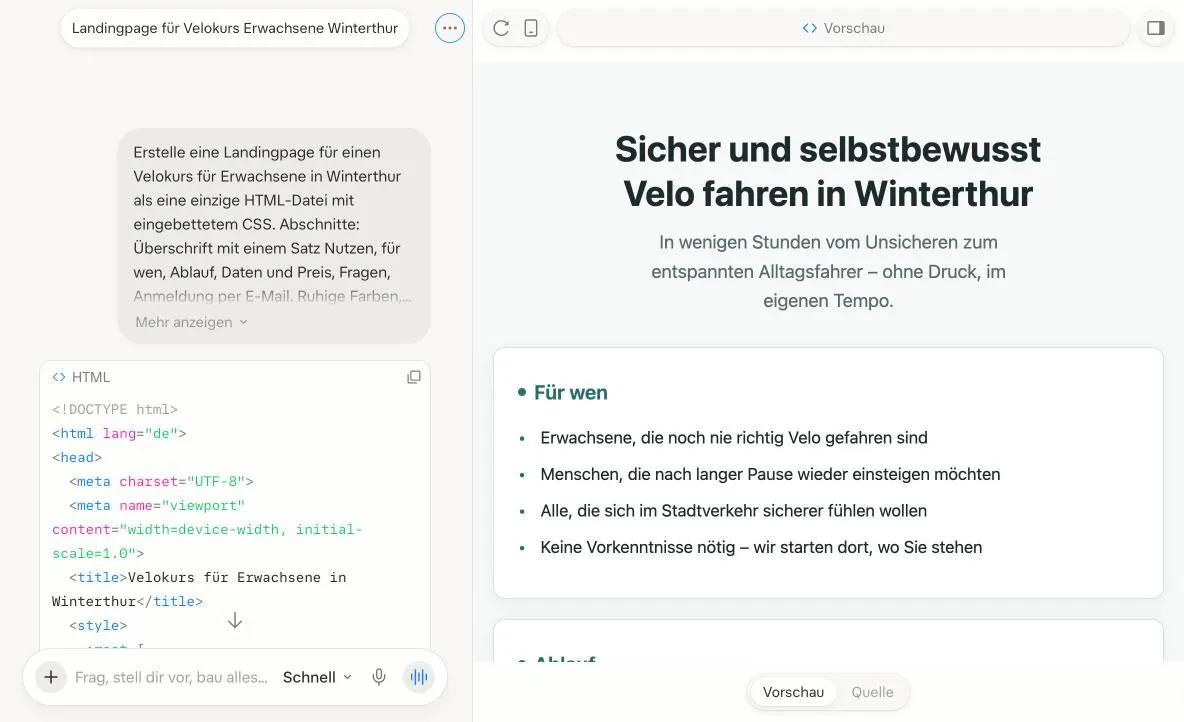
Grok writes a page as an "HTML" code block with Preview and Copy code in its header. Preview opens a panel on the right where you switch between Preview and Source and turn on the phone view. This worked on our free account.
Below the empty input box sits "Create a website". It switches to Apps mode, with templates such as landing page, event page and booking page. In our test, Grok created an HTML file there with a preview. Downloading worked, publishing did not. According to xAI, Grok Build has been available on every plan since August 2026 and is meant to publish pages on grok.me or a custom domain.
Share in the menu next to the chat title shares the chat, not the page. xAI's Europe privacy addendum says it processes the data of users in Switzerland, the EU and the UK in the United States.
Step by step
- Paste one of the prompts below at grok.com. Fast mode is enough for a page.
- Grok writes the code into an "HTML" block. Copy code sits at the top right of the block.
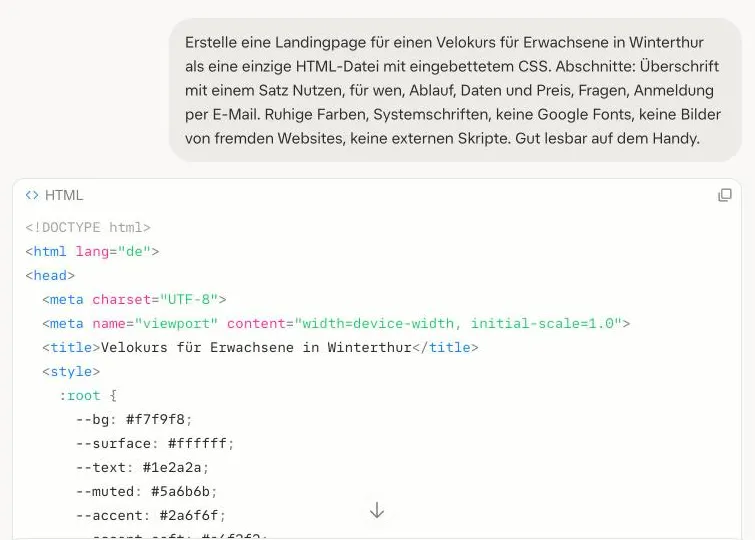
- Preview in the block header shows the page on the right. The phone icon at the top left switches to the narrow view.
- Paste it at app.getsharepa.ch/neu and compare the preview there.
- Pick an address such as
cycling-course.sharepa.pageand go live.
Prompts to copy
Course page with a sign-up button
Friendly tone
Countdown to the event
Just the code
Tips for Grok
A formal tone by default
In our German test, Grok addressed visitors formally even though the prompt did not ask for it. If you want a different tone, say so in the prompt or send "Friendly tone" afterwards.
Suggestions below the answer
Under the code, Grok suggests more pages, such as a landing page for a guided bike tour. Clicking one sends it as a new question. For changes to your own page, write the request yourself.
Share shows the chat
Whoever gets the link from Share sees the whole conversation with prompt and code, not the finished page.
Grok or sharepa
| Feature | Sharing in Grok | sharepa |
|---|---|---|
| Plan | Free | Free, 3 pages |
| What the link shows | The chat | The page |
| Address | Link on grok.com | name.sharepa.page |
| Custom domain | No | Yes, one on the free plan |
| Password | No | Yes, also free |
| Analytics | No | Yes, without cookies |
| Forms | No | Yes, entries in the app |
| Take offline | Yes, at grok.com/share-links | Yes |
Questions
Can Grok build websites?
Yes. Grok writes the whole page as HTML and shows it in a preview. In our test, Grok's code worked at sharepa straight away.
Are there Grok Sites?
There is no feature called Sites. Grok builds websites in the chat or in Apps mode. According to xAI, Build can publish on grok.me; our free account showed no button for it.
Is Grok Studio the same thing?
No. xAI says Grok Studio is no longer supported and points to Grok Build instead. The preview in code blocks is still there.
Do I need a paid plan?
No. Code, preview and Apps worked on our free account. Since October 2026, xAI sells Grok as part of the X subscription, where SuperGrok became Premium.
Sources
- xAI: Grok FAQ
- xAI: Grok Build for everyone
- xAI: X subscription
- xAI: Europe Privacy Policy Addendum
- More basics for every chat: Build a website with AI
Tested with a free account on 11 November 2026, Fast mode, interface in German.