Yes, you can build a website with Ecosia's AI chat, for free and without an account. Ecosia writes the code into the chat but shows no preview and cannot publish the page. Below: which prompts work and how to put the page online for free.
What Ecosia can do on its own
AI Chat is a tab on ecosia.org next to Web, Images, Videos and News, and works without signing in. Ecosia calls it a beta feature, available in 35 countries including the UK, the US and Switzerland. Its help centre says the answers come from small models, with Mistral providing the chat. Below the input box, it says it runs on European servers.
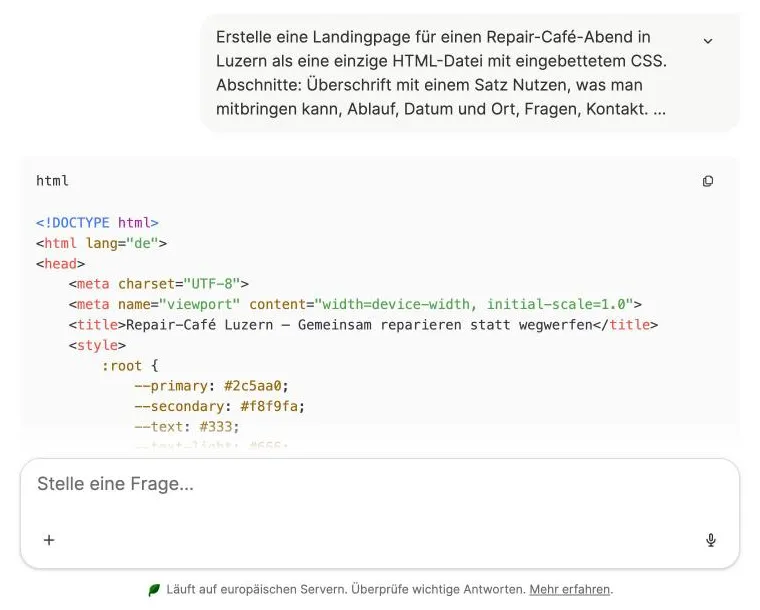
The page arrives as an "html" code block with a copy icon. There is no preview, and no sharing or publishing either. Without an account the chat is gone once you close it; with an Ecosia account it is saved.
Step by step
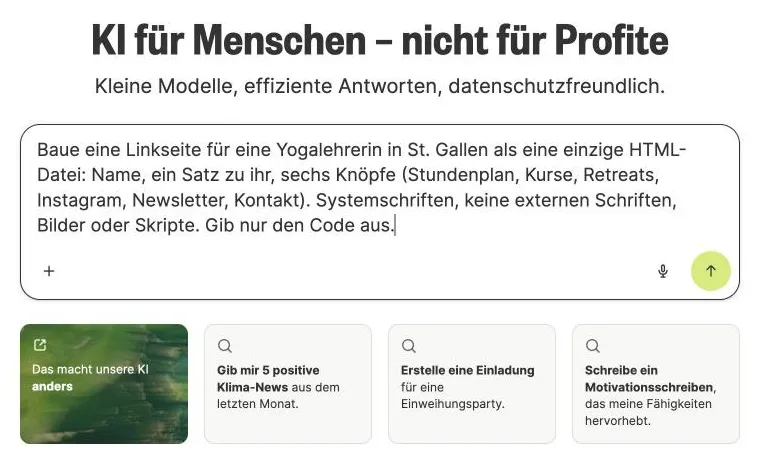
- Open the AI Chat tab on ecosia.org and paste one of the prompts below.
- Ecosia writes the code into an "html" block. Wait until the block ends with
</html>, then click the copy icon at the top right.
- Paste it at app.getsharepa.ch/neu. This is the first time you see the page, since Ecosia has no preview.
- Pick an address such as
repair-cafe.sharepa.pageand go live.
Prompts to copy
Event with schedule and contact
Link page with six buttons
Page for a community project
Tips for Ecosia
"Output only the code" helps
With that sentence at the end, our tests returned just the code block, with nothing before or after it. Both test pages were complete; the longer one had about 5,000 characters.
No preview, so check at sharepa
You only see what Ecosia built once you paste it. If something is off, describe it in the same chat and copy the new code.
Placeholder address and phone
Our test page had a made-up street, phone number and email. Replace them in the prompt or straight in the code.
Ecosia or sharepa
| Feature | Ecosia AI Chat | sharepa |
|---|---|---|
| Plan | Free, no account | Free, 3 pages |
| Preview of the page | No | Yes, also for phones |
| Public link | No | Yes |
| Custom domain | No | Yes, one on the free plan |
| Password | No | Yes, also free |
| Analytics | No | Yes, without cookies |
| Forms | No | Yes, entries in the app |
| Servers | In Europe, says Ecosia | In the EU |
Questions
Can Ecosia build a website?
Yes. Its AI chat writes a whole page as HTML. Both test pages ran at sharepa unchanged.
Are there Ecosia Sites?
No. Ecosia can neither publish pages nor share conversations; its help centre says so too. You put the code online with a service like sharepa.
Do I need an Ecosia account?
No. Both tests ran without signing in. You only need an account to keep the conversation.
Sources
- Ecosia help: AI Search and AI Chat
- More basics for every chat: Build a website with AI
Tested without an account on 11 November 2026, interface in German.